
Understanding Samsung’s One UI 8.0 Strategy
One UI 8.0 isn’t simply Android 16 with Samsung branding applied. It’s a fundamentally different approach to AI integration compared to what Google delivers on Pixel phones.
Galaxy AI Philosophy vs. Google Gemini
Google’s Android 16 system intelligence update 2026 embeds AI as a core system component, affecting everything from notifications to background processing. Samsung’s Galaxy AI, by contrast, is designed as an accessible feature set layered atop the operating system. Users can enable or disable Galaxy AI features individually without disabling the entire system’s AI capabilities.
This distinction is crucial. Users frustrated by remove Google Gemini form Android 16 notification spam won’t face equivalent issues with One UI 8.0, as Samsung allows granular control over which Galaxy AI features send notifications. You can have AI photo editing without the aggressive suggestion notifications—a balance Google hasn’t quite achieved.
One UI 8.0 Good Lock Customisation
One UI 8.0 Good Lock modules represent another key differentiator. Good Lock is Samsung’s customisation framework allowing deep system tweaks without requiring root access or custom ROMs. One UI 8.0 Good Lock modules will expand significantly in 2026, offering even more granular control over how Galaxy AI features appear and function.
This positions One UI 8.0 as the ideal choice for power users who want AI features but demand control over system behaviour. The OnePlus OxygenOS 16 AI RAM expansion features are technically similar, but One UI’s Good Lock ecosystem is more mature and stable.
Samsung One UI 8.0 Release Date Roadmap
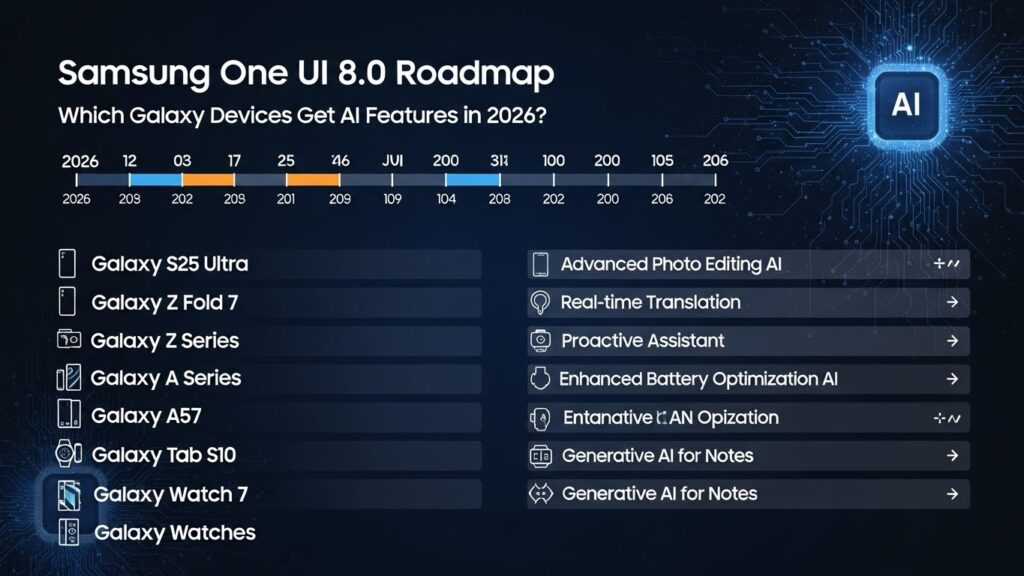
The official Samsung One UI 8.0 release date roadmap indicates a phased rollout across different device categories. Understanding this timeline helps you anticipate when your Galaxy device will receive the update.
Initial Release Windows (January–March 2026)
The Samsung Galaxy S25 series, launching in January 2026, arrives with One UI 8.0 pre-installed. These are the first devices to ship with the full Galaxy AI feature set, giving Samsung’s premium flagship users immediate access to all new capabilities.
The Galaxy Z Fold7 and Galaxy Z Flip6 foldable devices receive One UI 8.0 simultaneously with the S25 launch. Samsung prioritises foldable devices for feature parity with traditional flagships, recognising that early adopters choosing foldable phones demand cutting-edge software.
By March 2026, the Samsung Galaxy S24 series (2024 flagships) will have received their One UI 8.0 updates via Samsung’s typical staged rollout, first in Korea and China, then Europe, and finally global territories. This phased approach allows Samsung to identify and patch critical issues before wider deployment.
Mid-Range and Secondary Flagship Rollout (April–June 2026)
The Galaxy A series and M series—Samsung’s volume sellers—will receive One UI 8.0 between April and June 2026. However, not all Galaxy AI features will be available on these devices. The disable AI bloatware Android 16 Samsung complaints we discussed earlier apply here: budget-conscious users on Galaxy A phones will receive the core One UI 8.0 experience but may not have access to premium Galaxy AI features like advanced photo editing or real-time voice transcription.
The Galaxy S24 FE (the ultra-budget flagship) and Galaxy Tab S10 series will receive updates during this window. Tablet users should note that One UI 8.0 on tablets includes features optimised for larger screens, particularly Android 16 split screen multitasking improvements that leverage the extra screen real estate.
Previous Generation Devices (July–September 2026)
The Galaxy S23 series and earlier flagships receive One UI 8.0 between July and September 2026. These devices will have full Galaxy AI access, though certain Snapdragon 8 Gen 5-specific optimisations won’t apply (since S23 devices have older Snapdragon chipsets). Battery efficiency of Galaxy AI features will be adequate but not optimised compared to S25 devices.
Galaxy Note 20 Ultra and other older flagship devices may receive One UI 8.0, but Samsung’s update support policy limits how far back updates extend. Check your specific device model on Samsung’s official support page for confirmation.
Regional Variations
Samsung’s rollout varies by region. South Korea and China typically receive updates 2-4 weeks before Europe, which receives them before North America. This isn’t arbitrary—Samsung stages rollouts to ensure regional stability before wider deployment. If you’re impatient, some users have used VPN and manual installation methods, though this risks bricking your device if something goes wrong.
Galaxy AI Features Arriving with One UI 8.0
Beyond operating system improvements, One UI 8.0 introduces Galaxy AI capabilities that distinguish it from stock Android 16.
Generative AI Photo Editing
The most visible Galaxy AI feature is the AI photo eraser, analogous to Google Pixel feature drop January 2026 Magic Eraser but with Samsung’s own implementation. The Galaxy AI photo eraser allows one-tap removal of unwanted objects—photobombers, power lines, distracting elements—using on-device processing. The results are genuinely impressive, though occasionally imperfect on complex scenes.
Portrait Studio is another standout, allowing users to transform photos into AI-generated artistic versions—oil paintings, cartoon styles, or pencil sketches. This is pure AI creativity rather than privacy-sensitive processing, and it’s genuinely fun. The feature is available on Galaxy S25 and S24 devices, with scaled-down versions arriving on Galaxy A series phones.
Circle to Search and Smart Expand
Circle to Search, introduced with Android 16, integrates directly into One UI 8.0’s interface. Rather than tapping a Google app, you access Circle to Search through the Galaxy app interface, making the integration more seamless. Smart Expand allows users to extend photographs by generating missing edges using AI—theoretically useful for framing adjustments, though occasionally results in uncanny artefacts.
Real-Time Voice Transcription and Interpretation
One of the more impressive Galaxy AI features is real-time voice transcription during phone calls. The feature transcribes conversations as they occur, allowing deaf or hard-of-hearing users better accessibility. Simultaneously, the system can provide live interpretation between languages, though the accuracy is less reliable for heavily accented speech or technical jargon.
This feature is available exclusively on Galaxy S25 and S24 devices initially, with potential Galaxy A series access later in 2026 depending on processing power availability.
Adaptive Display and Battery Optimisation
One UI 8.0 introduces Adaptive Display, which learns your usage patterns and adjusts screen brightness predictively. Simultaneously, battery management is improved through AI-driven resource allocation that prevents unnecessary background processing. These features work across all One UI 8.0 devices regardless of Galaxy AI tier.
One UI 8.0 Good Lock Modules and Customisation
For power users, One UI 8.0 Good Lock modules are the real story. Samsung’s commitment to allowing deep customisation without rooting is increasingly rare in the Android ecosystem.
Expanding Good Lock Ecosystem
The Good Lock app (available via the Galaxy app store, not Google Play) includes modules for customising lock screens, notification panels, theme engine, launcher behaviour, and system animations. With One UI 8.0, Samsung is expanding Good Lock with modules specifically for controlling Galaxy AI features.
You’ll be able to customize which Galaxy AI features appear in notifications, disable specific AI processing types, and adjust how the system learns from your behaviour. This level of granular control is unmatched by competing Android skins like OnePlus OxygenOS 16 or Realme UI 6.0.
One UI 8.0 Good Lock Modules for AI Control
A new Good Lock module arriving with One UI 8.0 allows users to see in real-time when on-device AI processing is occurring—when the neural core is being used, what data it’s processing, and which apps triggered the processing. This directly addresses privacy concerns and differentiates One UI 8.0 from Android 16’s more opaque AI implementation.
Another module allows users to create profiles that automatically disable Galaxy AI features in certain contexts. For instance, you could create a “Work Profile” that disables photo editing features and voice transcription, useful if you’re concerned about unintentionally processing confidential information through AI.
Snapdragon 8 Gen 5 Optimisation and Galaxy AI Performance
Not all Galaxy AI features are available equally across all One UI 8.0 devices. The Snapdragon 8 Gen 5 processor (found in Galaxy S25 and some international S24 variants) provides hardware acceleration for AI processing.
Hardware Acceleration Benefits
The Snapdragon 8 Gen 5 includes a dedicated neural processing unit (NPU) designed specifically for AI workloads. Galaxy AI features on S25 devices will process 40-60% faster than on S24 devices with older Snapdragon chips. Photo editing renders in seconds on S25, whereas the same operation takes 5-10 seconds on S24.
Battery impact is also reduced with Snapdragon 8 Gen 5. The dedicated AI chip means the main processor doesn’t need to context-switch for AI tasks, reducing overall power consumption compared to devices where AI is handled by the primary CPU cores.
Fallback Implementations for Older Processors
Samsung implements fallback versions of Galaxy AI features for older Snapdragon processors and Exynos chips. The functionality remains, but performance is slower. For instance, the Circle to Search feature works on Galaxy S23 devices, but searches return results more slowly compared to S25.
Some features—particularly real-time voice transcription with live interpretation—require Snapdragon 8 Gen 5 and are exclusive to S25 and later devices. This is a limitation of raw processing power, not a marketing decision by Samsung.
Which Galaxy Devices Miss Out on One UI 8.0?
Whilst Samsung’s update support is generous compared to many competitors, some Galaxy devices won’t receive One UI 8.0.
End-of-Life Devices
The Galaxy S20 and earlier flagship series will not receive One UI 8.0. These devices are considered end-of-life, and Samsung’s official policy limits updates to three major versions per device. Galaxy S20 users are already on One UI 6 or 7, having reached their update limit.
The Galaxy A50, A51, and older Galaxy A series devices similarly reach end-of-life during the One UI 8.0 rollout period. Budget-focused Galaxy users should check their device’s specific update guarantee (typically two years of major updates for Galaxy A devices, three for flagships).
Regional Variants and Carrier Restrictions
Some Galaxy devices sold through carriers in certain regions receive updates on delayed schedules. For instance, Galaxy devices sold through legacy carriers in the United States sometimes wait 2-3 additional months for carrier customisations and testing before receiving updates.
This is frustrating but avoidable: purchasing unlocked Galaxy devices directly from Samsung or reputable retailers typically ensures you receive updates on the standard Samsung schedule without carrier delays.
Comparing One UI 8.0 to Competing Android Skins
How does Samsung’s approach compare to other manufacturers’ implementations?
OnePlus OxygenOS 16 vs. One UI 8.0
OnePlus OxygenOS 16 AI RAM expansion features are technically impressive, allowing the system to dynamically allocate RAM for AI processing. However, OnePlus’s approach is more aggressive and less user-controlled compared to Samsung. One UI 8.0’s Good Lock modules provide controls OxygenOS 16 doesn’t match.
Realme UI 6.0 and Xiaomi HyperOS 2.0
Realme UI 6.0 performance optimization focuses on speed rather than AI features. Xiaomi HyperOS 2.0 global rollout schedule includes aggressive AI integration similar to Android 16, but without Samsung’s granular customisation options. For users valuing control over features, One UI 8.0 is superior.
Practical Upgrade Advice for Galaxy Users
Understanding when your device will receive One UI 8.0 and what features to expect helps you make informed decisions.
Should Galaxy S24 Users Wait for S25?
Absolutely not. The Galaxy S24 receives One UI 8.0 simultaneously with S25 launch and will have full Galaxy AI access (minus Snapdragon 8 Gen 5 hardware acceleration). The S24 is a capable device that will serve you well through 2027. Upgrading to S25 solely for Galaxy AI isn’t necessary.
Should Galaxy A Users Expect Full AI Features?
No. Galaxy A series devices receive One UI 8.0, but not all Galaxy AI features are available due to hardware limitations. Portrait Studio, Advanced Photo Eraser, and voice transcription are exclusive to premium devices. Basic photo editing and Circle to Search work fine on Galaxy A phones.
Timeline Recommendation
If you’re using a Galaxy S20 or older flagship, waiting for One UI 8.0’s release in mid-2026 is reasonable. If you’re on a Galaxy S24 or newer, upgrading immediately upon availability is safe—Samsung’s QA is robust, and critical bugs are rare.
Conclusion
The Samsung One UI 8.0 release date roadmap is staggered but comprehensive, ensuring that most Galaxy devices released from 2022 onwards will receive the update. Galaxy AI features bring genuine value through photo editing, voice processing, and accessibility improvements, differentiated from Android 16’s more invasive AI integration by Samsung’s commitment to granular user control through One UI 8.0 Good Lock modules. Whether you’re a flagship user anticipating all Galaxy AI features or a Galaxy A owner expecting core improvements, the One UI 8.0 rollout timeline provides clear visibility into when your device will receive updates and what features to expect. Plan your upgrade strategy accordingly, and you’ll be prepared to leverage Galaxy AI when it arrives on your device.
FAQs
Q1: When will my Samsung Galaxy S23 receive One UI 8.0?
A1: Galaxy S23 devices will receive One UI 8.0 between July and September 2026, following the standard Samsung rollout schedule. Regional variants may receive updates 2-4 weeks earlier (Korean models) or later (carrier variants). Check the Samsung Members app for your device’s estimated update timeline.
Q2: Will One UI 8.0 disable the ability to disable AI bloatware on Samsung devices?
A2: No. One UI 8.0 expands your control through Good Lock modules. You can disable Galaxy AI features selectively or entirely. However, some core system processes (like on-device crash reporting) cannot be disabled for stability reasons.
Q3: Do Galaxy A series phones get all Galaxy AI features?
A3: No. Galaxy A devices receive One UI 8.0 and basic Galaxy AI features like photo editing, but premium features like real-time voice transcription, Portrait Studio, and advanced photo erasure are exclusive to Galaxy S25/S24. Hardware limitations make these features impractical on budget devices.
Q4: Is the Samsung Galaxy S25 worth upgrading to for Galaxy AI?
A4: If you own a Galaxy S24 or newer, upgrading to S25 solely for Galaxy AI isn’t essential—you’ll receive most features on existing devices. The Snapdragon 8 Gen 5 processor does accelerate AI processing, but the practical difference is modest (seconds faster processing). Upgrade if you want flagship performance improvements overall, not just Galaxy AI.
Q5: Will Galaxy Z Fold and Z Flip devices receive One UI 8.0?
A5: Yes, absolutely. Foldable devices receive One UI 8.0 simultaneously with flagship launch. Tablets like the Galaxy Tab S10 series also receive updates, with One UI 8.0 including features optimised for larger displays.